

The short version
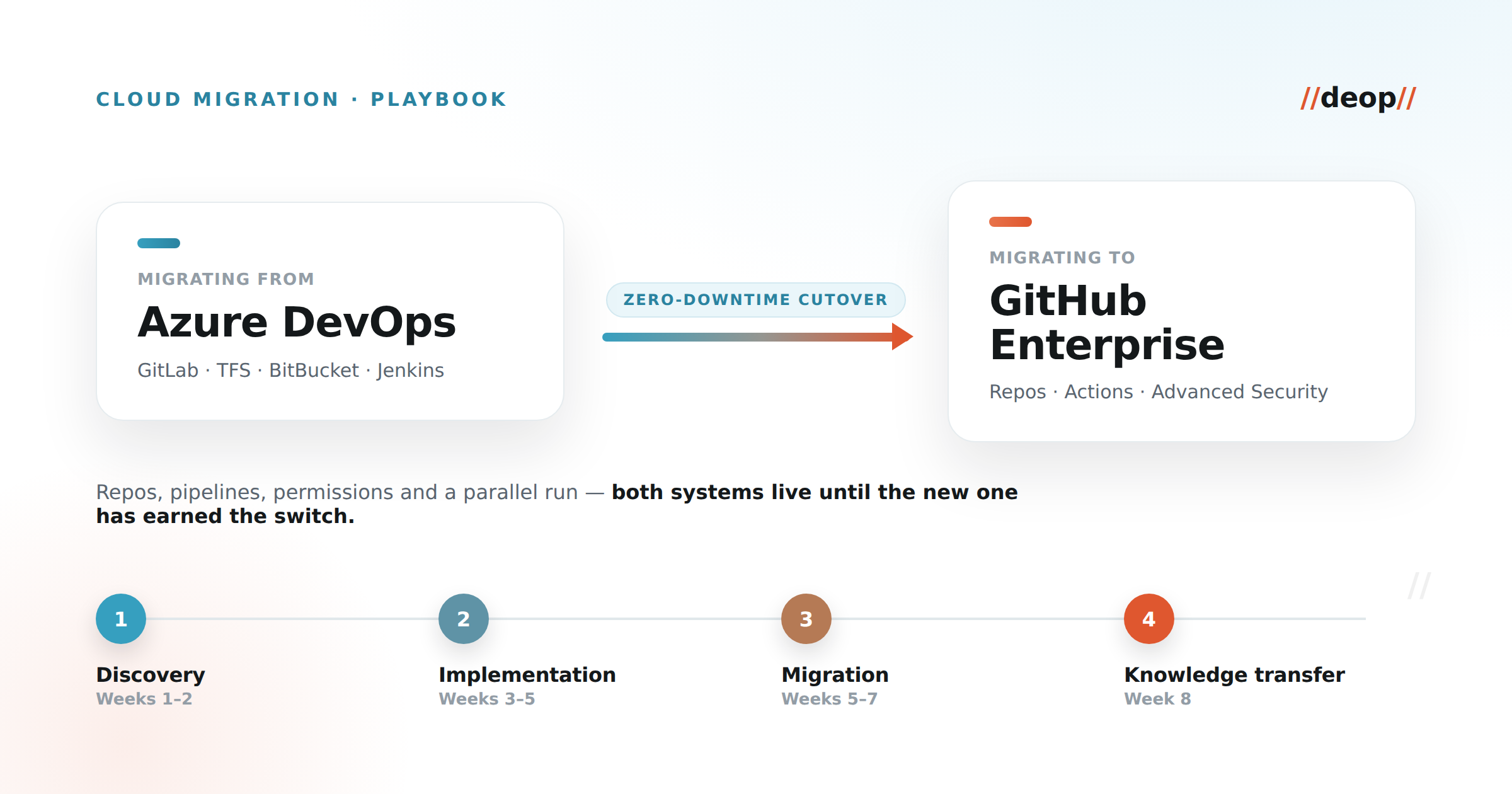
We've moved retailers, insurers, and software vendors off Azure DevOps, GitLab, and TFS onto GitHub Enterprise — and the reason those migrations stay boring, in the best possible sense, is that nothing gets flipped in a single weekend. You stand GitHub Enterprise up beside the source system, migrate in waves starting with the lowest-risk repositories, keep production pipelines shipping the entire time, and decommission the old platform only once the new one has proven itself.
Three principles hold every engagement together:
- Phased migration. Start with lower-risk repositories and build confidence before you touch anything business-critical.
- No disruption to production. Existing pipelines keep deploying while their replacements are built and validated in parallel.
- Parallel run before decommission. Both systems stay live until per-repository success criteria are met. Cutover is a decision, not a leap of faith.
You don't flip a switch. You run both systems in parallel until the new one has earned the cutover.
A typical engagement runs about eight weeks across four phases — discovery, implementation, migration, and knowledge transfer. The rest of this playbook walks each one, and spends most of its time on the four decisions that actually move the risk needle: how much history to bring, which user model to adopt, how to handle runners, and what the cutover runbook looks like.
Why teams move to GitHub Enterprise
The trigger is rarely "we dislike our current tool." It's consolidation. Teams that have accumulated a code host, a separate CI system, a bolt-on security scanner, and a code-review tool want one platform where source, pipelines, application security, and AI assistance live together. GitHub Enterprise gives you that: Actions for CI/CD, Advanced Security for secret and code scanning, and GitHub Copilot in the same place developers already work — which is where most of the day-to-day productivity gain actually comes from. Fewer integrations to maintain, one identity model, one audit trail, one bill.
The migration is the price of that consolidation. Done well, it's a controlled, auditable project. Done casually, it's the thing that pages you at 2 a.m. The difference is almost entirely in the preparation.
Before you migrate: discovery and inventory
The most expensive migrations are the ones that start with git push. Ours start with two weeks of discovery, and the single biggest predictor of a smooth project is who's in the room for it.
Get the whole migration team involved before any enablement begins — not just developers. A realistic table includes Development, DevOps/Platform, QA, Release Management, Security, IT/Operations, and Product. Each owns a decision you can't make for them: Security owns the user model and scanning posture, Release Management owns the cutover windows, Platform owns the runners. Start without them and you'll rediscover their requirements mid-cutover, which is the worst time.
With the team assembled, inventory the source environment. For CI/CD specifically, we assess every pipeline across five lenses:
- Pipeline inventory and mapping — every pipeline, what triggers it, and what it produces.
- Build and deployment architecture — how artifacts are built, staged, and promoted across environments.
- Security and compliance — secrets, approvals, and the controls that must survive the move.
- Integrations and dependencies — the package registries, external services, and internal tools each pipeline touches.
- Quality gates and testing — the checks that gate a merge or a release, and where they run.
This inventory is the map for everything that follows. It tells you which repositories are genuinely low-risk (good pilots), where the custom pipeline logic hides (budget follow-up sessions for these), and which integrations will need bespoke work rather than an off-the-shelf equivalent.
The foundation: enterprise structure, identity, and governance
Before a single repository moves, the target has to be built correctly, because the decisions here are the hardest to unwind later.
Start from the enterprise account. In GitHub Enterprise Cloud, a single enterprise account governs all of your organizations, users, teams, and billing. Get comfortable with the hierarchy — enterprise → organization → repository → team — and with the three repository visibilities: public, internal (visible across your enterprise but not externally), and private. Most regulated teams standardize on internal-by-default so that cross-team reuse is easy without anything leaking outside the company.
Choose your user model early — it's foundational. There are two options, and switching later is painful:
- Enterprise Managed Users (EMU): every account is company-owned and provisioned from your identity provider, with firm separation from public GitHub. This is the right default for most enterprises that want clean joiner/mover/leaver control and no personal-account entanglement.
- Standard users: developers use their own GitHub identities and join your organizations. This suits teams whose engineers live in open source daily and need one identity across public and private work.
We usually recommend EMU for enterprise clients precisely because of the identity separation — but it's a real trade-off, not a default to apply blindly.
Wire identity properly. SSO via SAML or OIDC, SCIM for automatic provisioning and deprovisioning, and a least-privilege access model from day one. If deprovisioning is automated, offboarding stops being a security gap.
Set the guardrails. Branch protection and pull-request policies (required reviewers, required status checks), GitHub Secrets scoped at the environment level rather than sprinkled across repositories, and an Actions allow-list — the sensible default is to allow enterprise-owned actions plus a curated set of verified third-party actions, and nothing else. When you're governing dozens or hundreds of repositories, apply these as policy-as-code rather than clicking through each repo by hand, so the rules are consistent and reviewable.
Make it auditable. Stream the audit log to your SIEM — Splunk, Datadog, or Azure Event Hubs — so security has the events they need in the tools they already watch. (Note the retention characteristics when you plan this: the in-product audit log holds most events for a limited window and Git events for a much shorter one, so streaming out is how you keep a durable record.)
Turn on the security you're paying for. GitHub Advanced Security gives you secret scanning, code scanning, and dependency review. Enabling it as part of the migration — rather than "later" — means the new platform is more secure than the one you left on day one, which is an easy win to point at.
Moving the repositories
With the foundation in place, the repositories themselves are the most mechanical part of the migration — as long as you've made one decision deliberately.
History depth is a cost lever, not just a preference. Migrating full history for every repository drives up storage cost and slows the transfer. Our default is to migrate the latest state by default and reserve full history for the repositories that genuinely need it. A common, pragmatic pattern is full history on the default branch and snapshots for the rest:
# Migrate a repo with full history using a short-lived, migration-scoped token.
git clone --mirror https://dev.azure.com/org/project/_git/payments
cd payments.git
git remote set-url --push origin https://github.com/acme-emu/payments.git
git push --mirror

# For large repos where full history is expensive, bring the default branch
# with history and snapshot the others to control storage:
git clone --single-branch --branch main https://dev.azure.com/org/project/_git/monorepo
Don't forget the packages. Code is only half the story. GitHub Packages covers the ecosystems most teams rely on — NuGet, Maven/Gradle, npm, and Docker/OCI container images among them — so plan the artifact and registry move alongside the code, not as an afterthought. This is a frequent source of "why is the build failing on GitHub" surprises when it's skipped.
Validate, then archive. After each repository transfers, confirm completeness — history, branches, and content all present and correct — and only then archive the source repository. That sequence gives you a clean, auditable definition of "done" for every repo, and a source of truth to fall back to until you're sure.
You don't have to move everything. One of the most useful scoping decisions we've made with clients is to migrate code to GitHub while keeping their existing project-management tool in place — for example, moving repositories off Azure DevOps but retaining Azure Boards for planning and work tracking. Migrating everything at once because it's all in one product is a choice, not a requirement. Scope to what delivers value.
Rebuilding pipelines in GitHub Actions
This is the hardest part of any ADO, GitLab, or Jenkins migration, and it deserves the most care. Repositories move; pipelines get rebuilt.
Start from the five-lens inventory you built in discovery. For every pipeline feature in the source system, find its GitHub Actions equivalent — most have a clean one in the Actions Marketplace — and explicitly flag the gaps that will need a custom action. A converted build pipeline is usually unremarkable, which is the goal:
name: build-and-test
on:
  push:
    branches: [ main ]
  pull_request:
jobs:
  build:
    runs-on: ubuntu-latest        # GitHub-hosted; swap for a self-hosted label if required
    steps:
      - uses: actions/checkout@v4
      - uses: actions/setup-dotnet@v4
        with:
          dotnet-version: '8.0.x'
      - run: dotnet restore
      - run: dotnet build --configuration Release --no-restore
      - run: dotnet test --no-build --verbosity normal
Runner strategy is a genuine decision. GitHub-hosted runners are the least-effort option and fine for most workloads. Self-hosted runners make sense when you need specific hardware, access to private networks, or tighter control for compliance — weigh them on cost, security, and access, and decide before you start converting, because it affects how every workflow is written.
Pick your pilot pipelines deliberately. Migrating alphabetically is how you end up debugging your most complex enterprise pipeline first. Choose a couple of representative-but-forgiving pipelines to prove the pattern, then scale.
The AI-assisted path is where this gets fast. Rather than hand-converting hundreds of pipelines, we drive the bulk of the work with GitHub's Copilot Coding Agent orchestrated from a dedicated migration repository — an IssueOps model where each pipeline becomes an issue and the agent opens an auto-generated pull request with the converted workflow. Source-specific prompt libraries handle the dialects of Azure DevOps, GitLab, Jenkins, BitBucket, CircleCI, Bamboo, Drone, and Travis, so the same orchestration migrates CI/CD from virtually any platform. A human reviews and merges every PR — the agent does the tedious 80%, engineers own the judgment.
Set expectations on timing up front — this is a good thing to put in a callout for stakeholders:
- Batch roughly 12–20 repositories in parallel.
- Simple pipelines land in about 5–15 minutes each, complex ones in 15–45 minutes, and enterprise-grade pipelines in 30–90 minutes.
- Those ranges are ranges on purpose: the model is non-deterministic, so plan for variance rather than a fixed rate.
One honest caveat: the Copilot Coding Agent path does not currently migrate self-hosted-runner configuration for you. If a pipeline depends on self-hosted runners, budget for hands-on work on that piece. Saying so keeps the whole plan credible — and it's exactly the kind of detail that separates a real playbook from a brochure.
The zero-downtime cutover
Everything so far exists to make this step uneventful. The cutover is where the discipline pays off.
Use a migration-scoped, short-lived token. Generate a source-system personal access token scoped only to what the migration needs, use it, and revoke it immediately afterward. A long-lived, broadly-scoped token sitting around after a migration is exactly the kind of thing an auditor — or an attacker — will find.
Confirm ownership before you start. Know whether you're migrating into a brand-new EMU enterprise or an existing one, and who creates and holds it. This sounds trivial and is a surprisingly common source of a stalled week.
Run in parallel, then decommission. Keep both systems live. Let real builds and real developers exercise the new pipelines alongside the old ones until the results match and the team trusts them. Only then do you decommission the source.
Define success and rollback per repository. The migration runbook should carry explicit, per-phase success criteria and a rollback procedure for each repository. Frame rollback as "the point where we'd pause and talk," not as failure — having the procedure written down is what lets everyone move confidently, because the escape hatch is real.
Mind the billing detail. GitHub Enterprise billing can be connected to an Azure subscription, and the right Azure tagging can unlock consumption discounts. It's a small line item in a migration plan and a meaningful one on the invoice — worth raising with whoever owns the cloud commitment.
After go-live: enablement and monitoring
The final week is knowledge transfer, and skipping it is how a technically-successful migration still gets a bad reputation internally. Run hands-on training for the teams now living in GitHub, hand over the documentation and runbooks, and hold a retrospective while the details are fresh.
Then keep watching. The audit stream you set up earlier is now your early-warning system. Confirm the per-phase success criteria held under real load, and close out the engagement against them rather than against a vibe. A migration is "done" when the criteria say so.
What we've learned
A few things worth internalizing before your own move — most of them are cheap to plan for and expensive to discover late:
- Storage cost balloons if you migrate full history everywhere. Decide history depth deliberately, per repository.
- Self-hosted runners aren't covered by the AI-assisted path today. Budget hands-on work where pipelines depend on them.
- Don't over-scope. Keeping a working project-management tool (Azure Boards or otherwise) is a valid, often smart, choice.
- Get every stakeholder in the room first. The most disruptive requirements are the ones a missing team surfaces mid-cutover.
- Non-image artifacts, custom pipeline logic, and integrations are where the follow-up sessions live. Plan for them so they're expected work, not surprises.
What good looks like
Across these engagements the pattern repeats: repositories migrated with the right amount of history, pipelines rebuilt and validated in a parallel run, governance and identity wired to the client's IdP, and the source system decommissioned only after the new platform proved itself — with production shipping the entire time. Teams come out the other side on a single platform for source, CI/CD, application security, and AI assistance, with less tooling to maintain and a cleaner audit story than they had before.
That's the whole point of doing it this way. The migration itself should be the least memorable part — because the day after cutover looks like any other day, except everything now lives in one place.
Deop moves software teams to GitHub Enterprise — from Azure DevOps, GitLab, TFS, BitBucket, and more — securely and with zero downtime. Explore our cloud migration work or see a GitHub migration case study.